



Last updated:
26.03.2026

 Excellent engraving quality
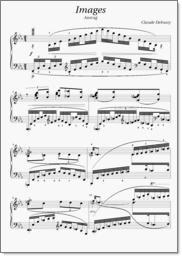
Piano-scores of the romantical or classical age are a real
benchmark for any notation program. The example-page - taken from a
debussy-piece - contains a lot of elements, which make engraving
of this music a challenge: voices going from one staff to the other,
wide spanning slurs and much more. Take a look at the enlarged
page to see, how PriMus masters this challenge.
What you cannot see from the picture, is the ease of operation:
Grip and shape the slurs to make them look optimal, shift
the beams as required, move the staves to get more space
between, move single notes to optimize the optical appearance.
All this is achieved in PriMus simply by using the mouse.
No tools, no nested menus, no complicated modes. Just direct access.
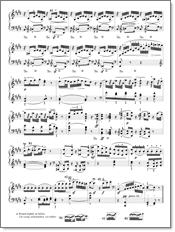
This typical page of a slow movement of a Beetoven piano-sonata
shows many elements: complex rhythms, articulations, fingerings,
trills and mordents, partially supplied with fingerings,
dynamics, all that makes out a score of extreme high density.
PriMus provides easy an intuitive control over all elements
and such supports the creation of a collision-free well
balanced score.
Special attention has to be given to the three 'footnotes',
which shall explain the performance of some ornaments.
Since PriMus can handle arbitrary staves on arbitrary positions
of the page and treat them as normal music-pieces, it's a
breeze to set those footers.
Facts:
- high quality engraving, close to good old handcraft
- automatical positioning, spacing and shaping of all symbols
- adjustable spacing parameters
- special cases like ossias and footnoes
- finest quality for all slurs and beams
- direct and easy editing: just grip what you see with your mouse and shift or reshape it
- user-refinements are preserved regardless of any auto-formatting